
Backup & restore operator for Kubernetes · Postgres 15–17 · PostGIS · MySQL 8.4
Hold fast to every second.
Tenax backs up the Postgres and MySQL databases you run in Kubernetes to your own S3 bucket and streams every change as it happens. Pick a second inside the window and get that exact database back in a sandbox you can query. Encrypted before it leaves the cluster, built crash-only so it never hangs.
One binary, one chart. Your bucket, your keys.
- Restore to
- 2026-10-10 14:02:37 UTC
- Base backup
- 20261010T020712Z-4c1e
- Then replay
- 114
$ tenax restore team/app --at 2026-10-10T14:02:37Z --wait
Watch it rewind, or drag across the window yourself. Ember ticks are the nightly full backups; the cyan band is the change stream between them. An illustration of a prod policy: nightly fulls, 7-day window.
- 9sto restore a 644 MiB Postgres database into a sandbox: fetch, decrypt, recover and run checks
- 4.2×smaller in the bucket: a 683 MiB physical backup stored as 161 MiB
- 72MiB/slogical full backup throughput on 4 vCPU, streamed with no temp files
- 20msp99 for the console overview with 1,000 databases and 100,000 backups
Measured with make test-perf and make test-ui on the k3d test harness (4 vCPU, in-cluster MinIO). The numbers are in the repository's docs/PERF.md.
01How it worksfive steps
From a live change to a sandbox you can query.
No agent inside your database, no volume snapshots. Tenax reads changes over the network, seals them before they leave the pod, and brings any second back when you ask.
- 01
Stream
Full backups on a schedule, plus every change as it happens: Tenax's own WAL receiver for Postgres, mysqlbinlog for MySQL.
WAL · binlog - 02
Encrypt
Every byte is compressed with zstd and encrypted with age to your public keys, inside the pod, in one streaming pass with no temp files.
zstd → age - 03
Store
Parallel multipart uploads to any S3-compatible bucket, a SHA-256 for every object, and the manifest written last.
*.zst.age · manifest.json - 04
Restore to a second
Ask for a time or a backup ID. Tenax picks the base backup and replays the changes up to that exact second.
--at 14:02:37 - 05
Open a sandbox
The result lands in a private database with a TTL and a read-only query console. Your checks run before the restore counts as a success.
--ttl 6h
02Restorefour destinations
Restore anywhere, without touching production.
A restore is a Kubernetes resource like any other. Ask for a time or a backup ID and pick where it goes. Tenax plans the base backup and the changes to replay, then runs your checks before it calls the restore a success.
A throwaway copy
A private database with a TTL, credentials and a read-only query console. It cleans itself up.
--to sandbox --ttl 6hA new database
Restored and checked in a staging sandbox, then copied to a new name. Existing objects are never overwritten.
--to new --database app_copyRoll back for real
Takes a safety backup first and asks you to type the target's name. Needs the restorer-admin role.
--to in-place --confirm appA dump file
A decrypted, compressed logical dump behind a link that expires in an hour. Audited.
--to download03See itone minute
One minute, start to restore.
Real commands and the real console against a demo catalog: list every database, see what changed overnight, restore it into a sandbox.

The console
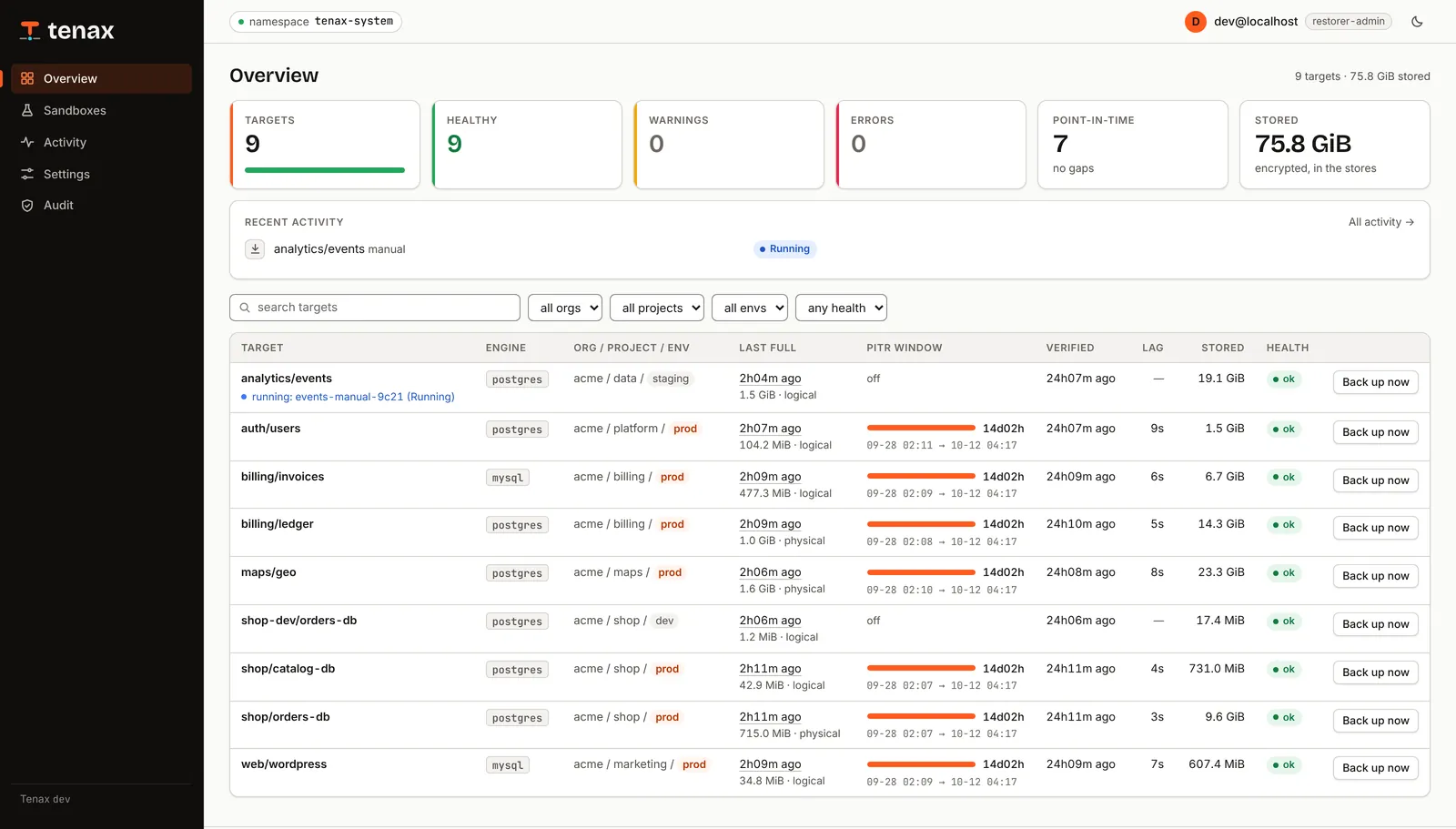
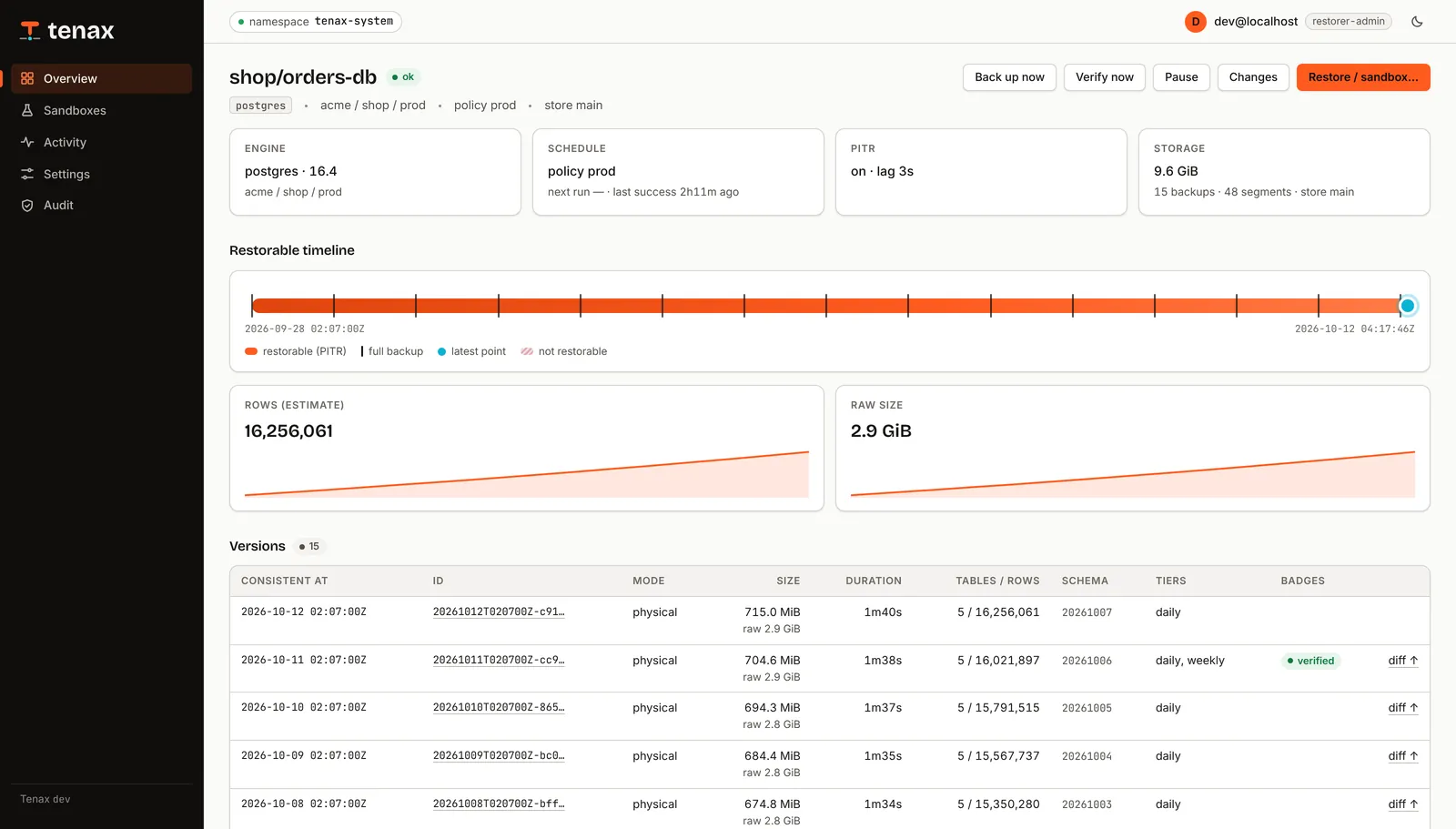
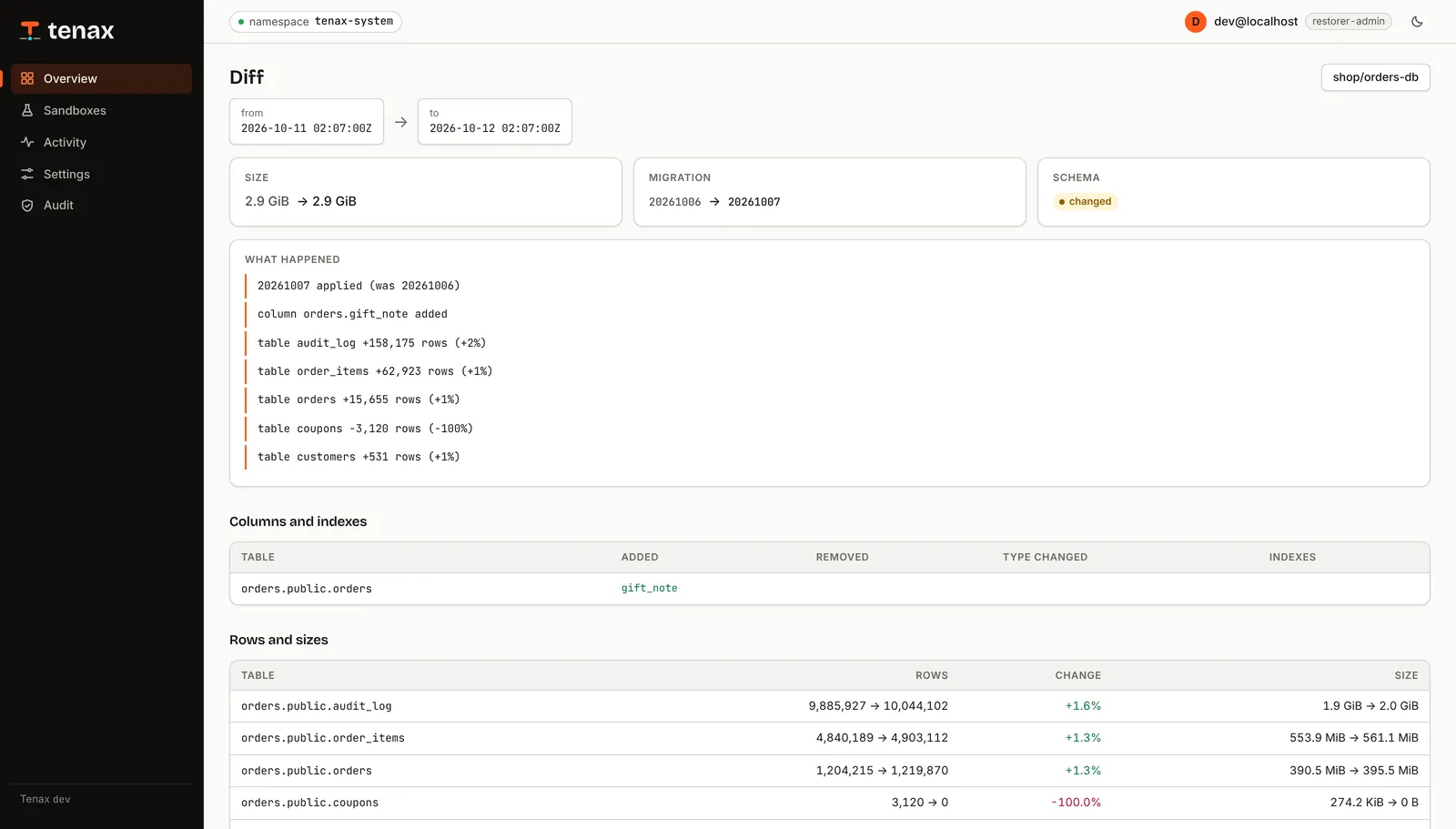
Know what changed between two versions.
Every backup carries an inventory of its tables, rows and sizes. Every change segment carries a summary of what it did. So before restoring anything, you can see which version still had the rows you lost.
- Diffs between any two backups. Schema changes, row counts and size per table.
- Change summaries per WAL or binlog segment. Inserts, updates, deletes and DDL per table, so a TRUNCATE at 22:48 is easy to find.
- Masked previews. Sample rows with the columns you list masked, readable with a catalog key that cannot decrypt the data itself.
The CLI
$ tenax targets
TARGET              ENGINE    ORG/PROJECT/ENV      LAST FULL             PITR WINDOW                                  STORED    HEALTH
analytics/events    postgres  acme/data/staging    2026-10-07 02:11:47Z  -                                            19.1GiB   ok
auth/users          postgres  acme/platform/prod   2026-10-07 02:11:06Z  2026-09-23 02:11:06Z → 2026-10-07 18:50:52Z  1.5GiB    ok
billing/invoices    mysql     acme/billing/prod    2026-10-07 02:09:03Z  2026-09-23 02:09:03Z → 2026-10-07 18:50:52Z  6.7GiB    ok
billing/ledger      postgres  acme/billing/prod    2026-10-07 02:08:22Z  2026-09-23 02:08:22Z → 2026-10-07 18:50:52Z  14.3GiB   ok
maps/geo            postgres  acme/maps/prod       2026-10-07 02:10:25Z  2026-09-23 02:10:25Z → 2026-10-07 18:50:52Z  23.3GiB   ok
shop-dev/orders-db  postgres  acme/shop/dev        2026-10-07 02:12:28Z  -                                            17.4MiB   ok
shop/catalog-db     postgres  acme/shop/prod       2026-10-07 02:07:41Z  2026-09-23 02:07:41Z → 2026-10-07 18:50:52Z  731.0MiB  ok
shop/orders-db      postgres  acme/shop/prod       2026-10-07 02:07:00Z  2026-09-23 02:07:00Z → 2026-10-07 18:50:52Z  9.6GiB    ok
web/wordpress       mysql     acme/marketing/prod  2026-10-07 02:09:44Z  2026-09-23 02:09:44Z → 2026-10-07 18:50:52Z  607.4MiB  ok
$ tenax diff 20261006T020700Z-bd79 20261007T020700Z-6da5
from  20261006T020700Z-bd79 (2026-10-06 02:07:00Z)
to    20261007T020700Z-6da5 (2026-10-07 02:07:00Z)

20261007 applied (was 20261006)
column orders.gift_note added
table audit_log +158,175 rows (+2%)
table order_items +62,923 rows (+1%)
table orders +15,655 rows (+1%)
table coupons −3,120 rows (−100%)
table customers +531 rows (+1%)

14 segments in between:
  00000001000000A100000000  18:51:32–19:20:32 · 800 commits · audit_log +3348 / ~1116 / −83 · order_items +1327 / ~442 / −33 · orders +330 / ~110 / −8 · customers +11 / ~3 / −0
  00000001000000A100000001  19:21:32–19:50:32 · 813 commits · audit_log +3352 / ~1116 / −83 · order_items +1328 / ~442 / −33 · orders +330 / ~110 / −8 · customers +13 / ~3 / −0
  00000001000000A100000002  19:51:32–20:20:32 · 826 commits · audit_log +3356 / ~1116 / −83 · order_items +1329 / ~442 / −33 · orders +330 / ~110 / −8 · customers +15 / ~3 / −0
$ tenax restore shop/orders-db --at 20261006T020700Z-bd79 --ttl 6h --reason "coupons truncated"
restore orders-db-sandbox-60414a15fc created (sandbox from 20261006T020700Z-bd79, 0 segments)
restore  shop/orders-db-sandbox-60414a15fc

$ tenax sandbox list
NAME      ENGINE    SOURCE            OWNER               PHASE         EXPIRES               IN-CLUSTER
sbx-7f3a  postgres  shop/orders-db    maria@acme.example  Ready         2026-10-08 00:37:32Z  tenax-sbx-sbx-7f3a.tenax-sandboxes.svc:5432
sbx-c210  mysql     billing/invoices  dev@acme.example    Provisioning  -
Output from the demo server in the repository: go run ./hack/demo, then point the CLI or a browser at it.
Console, CLI and API
One JSON API described by OpenAPI, with roles from Cloudflare Access. Every write and every query is audited.
GitOps native
Stores, policies, targets and restores are CRDs. Retention tiers, alerts and a Grafana dashboard ship with the chart.
Verified, not hoped for
Scheduled verification restores run your SQL checks against a real restore and mark the backup verified. Their restore time is exported as a metric.
04Reliabilitycrash-only
Never hangs. Shrugs off a kill -9.
Backups fail at night in boring ways: a stuck mount, a dead pod, a half-written file. Tenax is built so that none of them can wedge it or pass for a backup.
- data/part-00001.zst.age
- data/part-00002.zst.age
- data/part-00003.zst.age
- manifest.json
- data/part-00001.zst.age
- data/part-00002.zst.age
- data/part-00003.zst.age
- manifest.json
Never hangs
No mounts or block devices; databases only over the network. Every stream has a progress watchdog, and every tool runs in its own process group.
Crash-only
Kill any pod at any moment. A backup exists only once its manifest is written last, and the chaos suite kills Tenax mid-backup to prove it.
Data moves in Jobs, never in the controller.
The controller only schedules. Movers and streamers carry the bytes through one streaming pipeline straight into your bucket, and the restorer brings them back.
Gentle on production
One least-privilege database user that never writes. Per-host slots, bandwidth limits, and a load guard that postpones a backup when the server is busy.
Change streaming
Tenax's own WAL receiver on a replication slot for Postgres and mysqlbinlog for MySQL. The window reaches the present, even on a quiet database.
Fast by construction
Streaming pipelines with no temp files, parallel multipart uploads, multi-threaded zstd, and an in-memory catalog behind a console that answers in milliseconds.
Small enough to forget it is there.
Tenax is one Go binary. The controller and the API only schedule and read; bytes move in short-lived Jobs that exit when they are done, so nothing heavy sits in your cluster between backups.
Working set reported by the kubelet in the k3d test cluster (12 databases) after the end-to-end and chaos suites; CPU at rest is a few millicores. Each database with point-in-time recovery also runs a streamer, about 70 MiB while it streams.
05Securityencrypted at the source
Your bucket only ever sees ciphertext.
Encryption happens in the pod, before upload, to keys that Tenax does not hold. Access is split by role, and every write and every query leaves an audit record.
$ head -c 200 data/part-00001.zst.age
age-encryption.org/v1
-> X25519 Qm9yZWQ/IE5vdGhpbmcgdG8gc2VlIGhlcmUu…
--- 7Hc1kS0zR2QeYc…
ÌÞ#ø§ñ¹t¤¢Ý}Ï°ë։ÿ]Wœ3Ð÷…
Every data object is an age file encrypted to your recipients (X25519). Only the manifest is plain JSON, and it holds no secrets.
Encrypted before it leaves
Every object is encrypted client-side with age to your keys. The bucket never sees plaintext, and the console's catalog key cannot read data.
A catalog key that cannot read data
The console reads inventories and masked previews with a separate catalog identity. It cannot decrypt dumps, base backups, WAL or binlogs.
Checked end to end
The manifest holds a SHA-256 for every stored object, checked at the end of every read, and is itself written last with a conditional PUT.
Secrets stay out of sight
Database credentials reach child tools through sealed in-memory files, never through argv or the environment. Logs redact anything that looks secret.
Roles and an audit trail
Sign-in through Cloudflare Access and four roles, from viewer to restorer-admin. Restoring in place needs the top role and a typed confirmation.
Locked-down pods
Non-root, read-only root filesystem, every capability dropped, RuntimeDefault seccomp. Data-path pods mount only emptyDir.
06Comparedto a cron job
More than a nightly dump in a bucket.
| When you need to… | cron + pg_dump script | Tenax |
|---|---|---|
| Get back to 09:41:27 | Last night's dump, up to 24 h lost | Any second in the window |
| Prove a backup restores | Find out during the incident | Scheduled verification restores with your checks |
| Find the version with the missing rows | Restore several and look | Diffs and change summaries in the console |
| Look without risk | Restore over a shared staging database | A private sandbox with a TTL |
| Keep the bucket blind | Server-side encryption, if configured | Client-side age encryption to your keys |
| Survive a node dying mid-backup | A half-written file that looks complete | Nothing counts until the manifest is written last |
| Know it is still working | Silence | Alerts for overdue backups, broken chains and lag |
07Installabout ten minutes
From zero to restorable.
Install the chart
CRDs, the controller, the API and console, RBAC, alerts and the dashboard.
helm install tenax charts/tenax -n tenax-system --create-namespace \
  --set image.repository=registry.example.com/tenax/tenax --set image.tag=v0.1.0 \
  --set 'targetNamespaces={team-a}'
Point it at a bucket and your keys
Any S3-compatible store. Generate an age key with age-keygen and keep an offline copy.
apiVersion: tenax.republic.global/v1alpha1
kind: BackupStore
metadata: { name: main }
spec:
  s3:
    endpoint: https://s3.example.com
    region: us-east-1
    bucket: db-backups
    credentialsSecret: { namespace: tenax-system, name: tenax-s3 }
  encryption:
    ageRecipients: [age1…]   # public key only; the private key stays offline
Declare a target next to the database
Create the tenax database user with the SQL in docs/sql/, then commit the target to git.
apiVersion: tenax.republic.global/v1alpha1
kind: BackupTarget
metadata: { name: app, namespace: team-a }
spec:
  engine: postgres
  endpoint: { host: postgres, port: 5432 }
  databases: [app]
  policy: prod             # nightly fulls, 7-day point-in-time window
  credentials:
    secretRef: { name: tenax-postgres }
Restore something, on purpose
The first full backup starts on its own. Then try the thing you hope you never need.
tenax targets
tenax restore team-a/app --at 2026-10-07T09:41:27Z --wait
tenax query <sandbox> -e "select count(*) from orders"
The full guide, every CRD field and the REST API are in the documentation.
08FAQstraight answers
What engineers ask first.
Which databases does Tenax support?
Postgres 15, 16 and 17, including PostGIS, with physical or logical full backups and WAL streaming. MySQL 8.4 with logical full backups and binlog streaming.
How far back can I restore, and how precisely?
Any full backup your retention tiers keep, and any second inside the point-in-time window your policy sets. The example prod policy keeps a 7-day window and 14 daily, 8 weekly, 12 monthly and 5 yearly fulls.
Can Tenax or my storage provider read my data?
The bucket cannot: every object is encrypted with age to your recipients before upload. The console reads inventories with a catalog key that cannot decrypt the data itself. Restores decrypt with an age identity you provide, so keep an offline copy of it.
What happens if a pod dies in the middle of a backup?
Nothing that counts. A backup exists only once its manifest is written, after every object is uploaded and checksummed. A half-finished run has no manifest, so it is never offered for restore. The chaos suite kills Tenax mid-backup to prove it.
Does Tenax mount volumes or use snapshots?
No. It reaches databases only over the network, and its pods mount nothing but emptyDir: no hostPath, FUSE, iSCSI or block devices, and no PVCs by default. A stuck storage driver cannot hang a backup.
What does Tenax need from my database?
One least-privilege tenax user per database that never writes, created with the SQL in docs/sql/. Without replication rights Tenax still takes logical backups and tells you what to grant for restore to any second.
Is Tenax open source?
It is source-available under The Republic Lex Aequa License 1.0. Anyone may use, modify and redistribute it free of charge, including in production at commercial companies, to protect their own data. Selling or hosting it as a service for third parties is reserved.
